Mmm Pie
Install
From this article.
Write the SD card with Raspberry Pi Imager then:
- Choose OS
- Choose storage (the SD card)
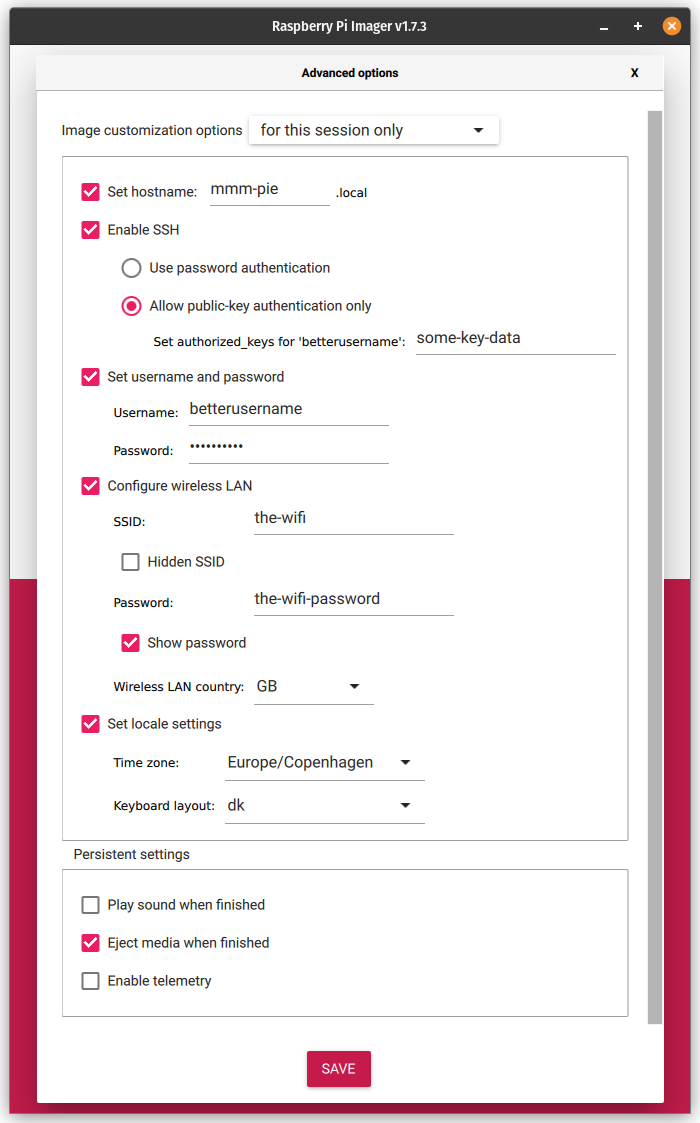
- But before clickiong “Write”, click settings (cogwheel lower right corner)
- Set hostname (can be done later, but convenient)
- Enable SSH, preferably with public-key authentication
- Set username and password, and choose something other than
pifor the username ;-) - Configure wireless LAN if needed
- Set locale (can also be done later)
- Click “Save”
- Click “Write”
Sudo settings
For some unknown reason, Raspbian seems to insist on insecure sudo settings.
For example not requiring password for ANY user!
# To fix remove:
sudo rm /etc/sudoers.d/010_pi-nopasswd
Or letting the session run even after 5 minutes, and if user logs out:
# To fix remove:
sudo rm /etc/sudoers.d/010_global-tty
This is completely nuts in my opinion… ¯\_(ツ)_/¯
Protect your Pi
17 Security Tips To Protect Your Raspberry Pi Like A Pro
Network
Want to change network settings and/or set a static IP address… well Raspberry Pi is a mess. (Said the old fart used to Debian).
Used to be set through /etc/dhcpcd.conf but now it seems to have changed to NetworkManager.
Try nmcli or nmtui.
Disable Wifi and Bluetooth
Add to /boot/firmware/config.txt:
[all]
dtoverlay=disable-wifi,disable-bt
Courtesy of Nils Marving
Pi bugs you about setting up ‘a valid user’
Sometimes when setting up Rasbian as detailed above, and configuring username and password before first boot, it ends up displaying this message on each and every login:
Please note that SSH may not work until a valid user has been set up.

See http://rptl.io/newuser for details.
This is driven by a file located in /etc/ssh/sshd_config.d called rename_user.conf.
Remove that file, and the message dissapears.
Change default username after install
I always go for the quick and dirty, but here is the article.
Change to root:
sudo -i
Rename pi to your username of choice:
sed -i s/pi/<new_user>/g /etc/passwd
sed -i s/pi/<new_user>/g /etc/shadow
sed -i s/pi/<new_user>/g /etc/group
sed -i s/pi/<new_user>/g /etc/sudoers
sed -i s/pi/<new_user>/g /etc/gshadow
mv /home/pi /home/<new_user>
reboot
WARNING this enables the password when using sudo so if you haven’t changed the password before doing this, you will be locked out of your Pi.